



1. What is MSU Explorer?
MSU Explorer is a platform where Maplers can view all on-chain data related to Henesys L1, the mainnet of MapleStory Universe. MSU Explorer is officially supported by CrossAngle that provides various crypto asset-related services through Xangle. MSU Explorer therefore operates under CrossAngle Terms of Service, separate from those of MapleStory Universe. For more details, please refer to the bottom-left section of MSU Explorer website. [Go to Terms of Service] Additionally, important usage notices that Maplers must follow while using MSU Explorer are provided in the form of a Disclaimer, located to the right of the Terms of Service link.2. MSU Explorer Main Dashboard
On MSU Explorer’s main page, Maplers can view the latest information on Henesys L1 at a glance.2.1. Search Bar
Maplers can search for detailed blockchain data by entering one of the following into the search bar:- Transaction Hash Value: View details of the transaction, the related block, and associated logs.
- Block Number: Check block data, including all transactions and internal transactions.
- Wallet Address: View all related transactions, internal transactions, and token data (ERC-20, ERC-721, ERC-1155).
- Token: Check details about a specific token.
- NFT: View information about a particular NFT.
2.2. Main Dashboard
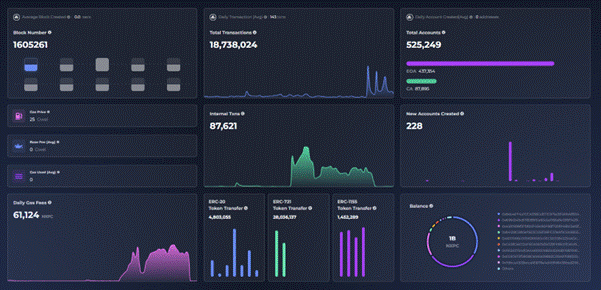
Please note that the image shows test environment and may not reflect the live data.
Additionally, at the bottom of the main dashboard, Maplers can view the 10 most recent blocks and the 10 most recent transactions.
Clicking on each entry allows Maplers to view its detailed information:
- Latest Blocks: Displays the 10 most recent blocks, including gas used, number of transactions, and block rewards
- Latest Transactions: Displays the 10 most recent transactions, including transaction hash, amount of NXPC transferred, sender wallet address, and recipient wallet address
3. MSU Explorer Navigation Tabs
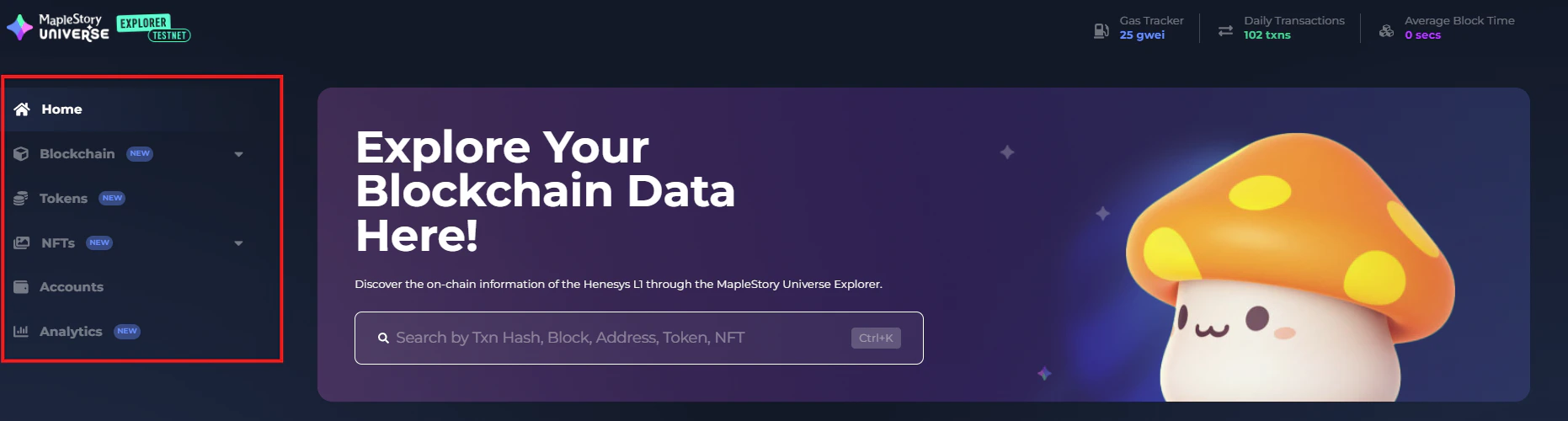
Please note that the image shows test environment and may not reflect the live data.
- Home: Navigates to the main homepage of MSU Explorer
- Blockchain: Provides access to core blockchain data across four sub-tabs
- Transactions: View all transactions on Henesys L1 in reverse chronological order
- Internal Transactions: View all internal transactions executed via smart contracts, listed by latest first
- Blocks: Explore all blocks on Henesys L1 starting from the most recently generated
- Deployed Contracts: View smart contracts deployed on Henesys L1
- Tokens: Displays information about supported tokens on Henesys L1
- All Tokens #1: Native governance token of MapleStory Universe – NXPC
- All Tokens #2: In-game utility token – NESO
- Token Transfers: Lists all token transfers on Henesys L1 in reverse chronological order
- NFTs: Offers complete visibility into NFT-related activity across three sub-tabs
- All NFTs & Transfers: View all NFT types on Henesys L1 and their transfer history
- NFT Trades: Review all NFT trades that have occurred via the MSU Marketplace
- NFT Mints: Track all NFT minting events from within MapleStory N
- Accounts: Lists all accounts connected to MapleStory Universe, ordered by NXPC token balance in descending order
- Analytics: Visualize Henesys L1 network and token trends through four categories
- User: Charts the trend of Unique Active Wallets connected to MapleStory Universe
- Network: Shows historical data on the number of transactions over time
- Token: Displays holder trends for NESO, NXPC, and NFTs
- Marketplace: Tracks the number of unique accounts actively trading on the MSU Marketplace